Absence Management Permissions
Absence Management Permissions decide what each role can do inside the Absence Management module. Administrators set these permissions from the role profile in Users & Roles.
Use permissions to separate normal employee access from administrator access. For example, most employees may create their own requests, while only administrators can change settings or manage blocked periods.
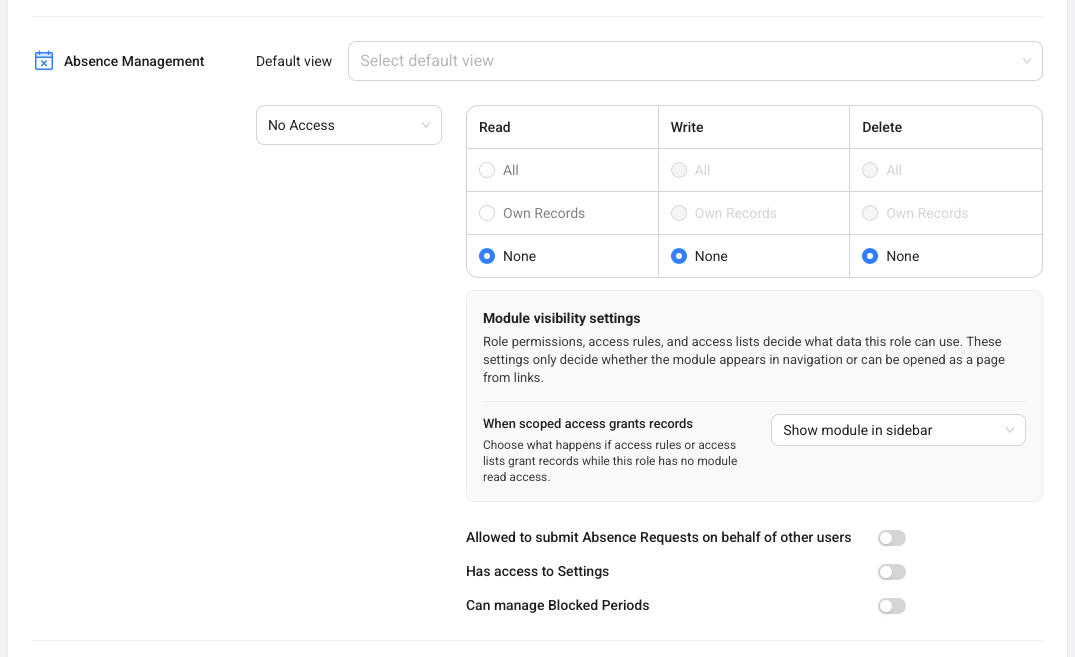
How To Open Absence Management Permissions
Open Absence Management permissions from the role you want to change.
- Open Users & Roles.
- Open the relevant role.
- Go to Module Permissions.
- Find Absence Management.
- Set the read, write, and delete access.
- Review the Absence Management capability switches.
- Save the role.
Module visibility and record access decide whether the module appears in navigation and what records the role can use.
What The Permission Switches Mean
Absence Management has three important capability switches for administrators.
| Permission | What It Allows |
|---|---|
| Allowed to submit Absence Requests on behalf of other users | The role can create requests for another employee. |
| Has access to Settings | The role can open and change the Settings tab in Absence Management. |
| Can manage Blocked Periods | The role can create, edit, and delete blocked periods. |
Only give these permissions to roles that should manage absence policy or support employees with their requests.
Recommended Role Setup
Most departments use a simple split between employee access and administrator access.
Employees usually need access to create their own requests, review their balances, and see the calendar. Approvers need enough access to open requests, review details, and approve or decline them. Administrators need settings access, blocked period management, and sometimes permission to submit requests for other users.
Review these permissions whenever your department changes its approval process or creates a new administrator role.