Task Dependencies
Dependencies let you express relationships between tasks — things like "this task can't start until that one is finished." They give your team visibility into which tasks are blocked and which tasks are blocking others.
Dependencies in Compass are informational, not scheduling constraints. They do not automatically recalculate or shift a task's start or due date when the predecessor slips. Think of them as smart links that surface blocked work — not as a Gantt scheduling engine.
The two perspectives
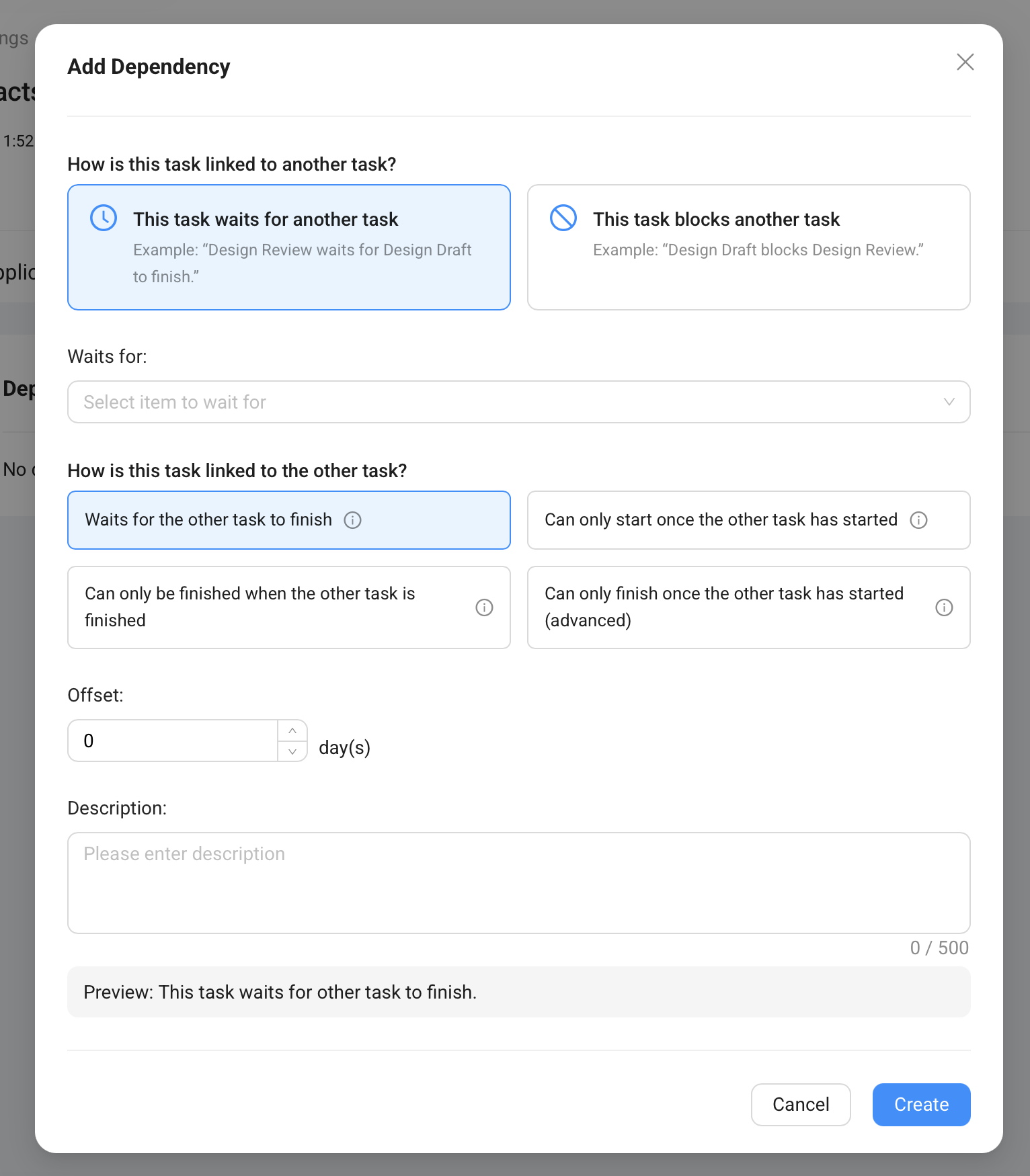
When adding a dependency, you choose which direction the relationship runs from the current task:
This task waits for another task — the current task is the one being held up. You're saying: "I can't proceed until the other task reaches a certain state."
Example: "Design Review waits for Design Draft to finish."
This task blocks another task — the current task is the one holding up something else. You're saying: "Another task is waiting on me."
Example: "Design Draft blocks Design Review."
Both options create the same underlying link — they're just two ways to describe the same relationship from different vantage points. Use whichever feels more natural given the task you're currently editing.
Relationship types
Once you've chosen a direction, you pick how the two tasks are related. The UI shows these in plain language:
| Option | What it means |
|---|---|
| Waits for the other task to finish | Can't start until the other task is complete — the most common type |
| Can only start once the other task has started | Work can begin in parallel, but this task needs the other to have kicked off first |
| Can only be finished when the other task is finished | Both tasks run in parallel, but this task can't be signed off until the other one is also done |
| Can only finish once the other task has started (advanced) | A rare scenario — this task wraps up only after the other task has begun |
For most situations, "waits for the other task to finish" is the right choice. The others are available for teams that need to model more nuanced sequencing.
Offset
The Offset field (in days) adds a buffer between the dependency condition being met and when this task should proceed.
Offset = 0 (default): The dependency is immediate — as soon as the other task finishes, this one can start.
Offset = 5 days: There's a 5-day window between the predecessor finishing and this task beginning. Useful when there's a natural waiting period — for example, materials need 7 days to cure before installation work can begin.
How dependencies appear on tasks
On the individual task view, you'll see indicators that give immediate context:
- "Waiting for X task(s)" — this task is blocked; the listed predecessor tasks haven't reached the required state yet
- "Blocks X task(s)" — this task is holding up other tasks; completing it will unblock them
These indicators make it easy to spot bottlenecks without having to cross-reference the whole project task list. If a task is marked as blocking three others, that's a clear signal it deserves priority attention.
Dependencies in Task Catalog Items vs. project tasks
You can define dependencies at the catalog level (in Task Catalog Items) or directly on a project task.
Catalog-level dependencies carry over automatically when tasks are generated. If Catalog Item B is set to wait for Catalog Item A, the generated Task B will wait for generated Task A on every project. This is the recommended approach — define the sequencing logic once, and it propagates to every project.
Project-level dependencies are added ad hoc on a specific project. Use these for one-off relationships that don't apply universally.
A note on dates
Because dependencies don't recalculate dates, a slipped predecessor won't automatically push out a dependent task's due date. Instead, the dependency shows up as a visual indicator: the task is waiting, and the team can see exactly what it's waiting for.
If a predecessor is significantly delayed and you need to adjust downstream dates, do that directly on the project (either by editing individual task dates or by shifting the project's reference date, which will update all tasks that have relative dating configured).