Budget Presets
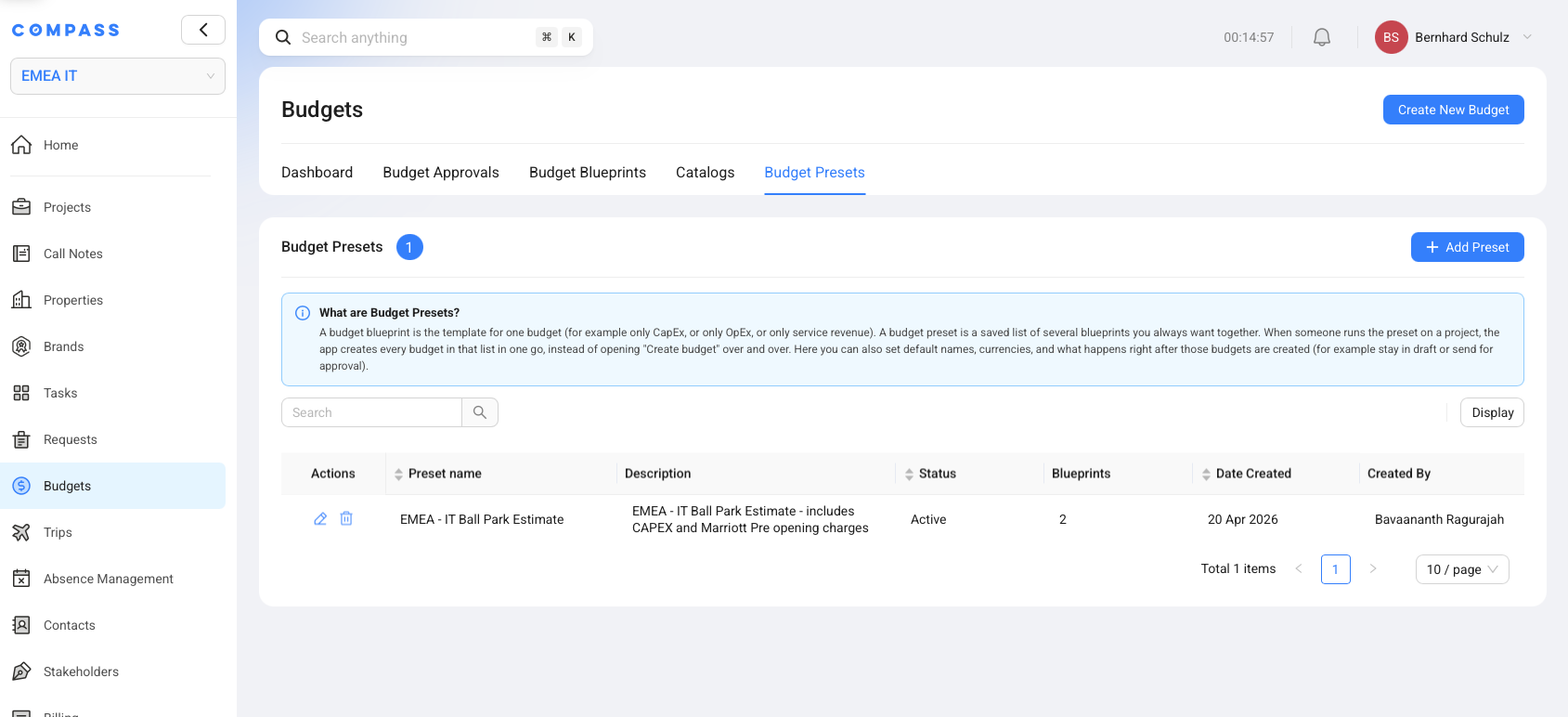
A Budget Preset is a saved package of budgets that should be created together for a project. It lets a user create several standard budgets in one action instead of creating each budget one by one.
Think of a Budget Preset as a prepared bundle. Each budget in the bundle comes from a Budget Blueprint. When you run the preset from a project, Compass creates all budgets in that bundle for that project.
Budget Presets are useful when the same group of budgets is needed often. For example, an opening project may usually need one Capital Expenditure (CapEx) budget and one Service Revenue budget. A preset lets the team create both from the project with one Create Budget action.
Why Budget Presets Exist
Budget Presets exist because project teams often need the same set of budgets again and again. Without a preset, a user has to create one budget, choose a blueprint, review the setup, save it, and then repeat the same steps for the next budget.
A Budget Preset removes that repeated work. An administrator sets up the package once. After that, project users can select the preset and let Compass prepare all included budgets together.
For example, an EMEA - IT Ball Park Estimate preset could create:
- one CapEx budget for equipment and vendor costs
- one Service Revenue budget for opening service fees
The exact budgets depend on the blueprints added to the preset. The idea is always the same: a preset turns a repeated budget package into one project action.
Where Budget Presets Sit In Compass
Budget Presets live in Budget Estimator -> Budget Presets. This is where administrators create and maintain the saved preset list.
The Budget Presets table shows the main information users need before opening a preset:
| Column | What it means |
|---|---|
| Preset name | The name users see when choosing a preset from a project. |
| Description | A short explanation of what the preset creates. |
| Status | Whether the preset is active and available for use. |
| Blueprints | How many Budget Blueprints are included in the preset. |
| Date Created | When the preset was created. |
| Created By | The user who created the preset. |
You only see the Budget Presets area if your role has permission to access it. If the tab is missing, your COMPASS Administrator may need to adjust your Budget Estimator permissions.
How Budget Presets Use Budget Blueprints
A Budget Preset uses Budget Blueprints as its building blocks. Each blueprint inside the preset creates one budget.
A Budget Blueprint is the setup for one budget. It stores the budget type, linked catalogs, financial defaults, and approval settings. A Budget Preset then groups one or more of those blueprints together.
For example, a preset may contain two blueprints:
| Blueprint in the preset | Budget created from it |
|---|---|
IT Opening Ball Park Estimate - Payable to Vendors | One CapEx budget |
IT Opening Services Fees - Payable to Marriott | One Service Revenue budget |
When a user runs the preset on a project, Compass creates one project budget for each blueprint in the preset.
What You Set Up In A Budget Preset
A Budget Preset stores the choices Compass needs when it creates several budgets from a project. The preset does not store the finished project budgets. It stores the saved instructions for creating them.
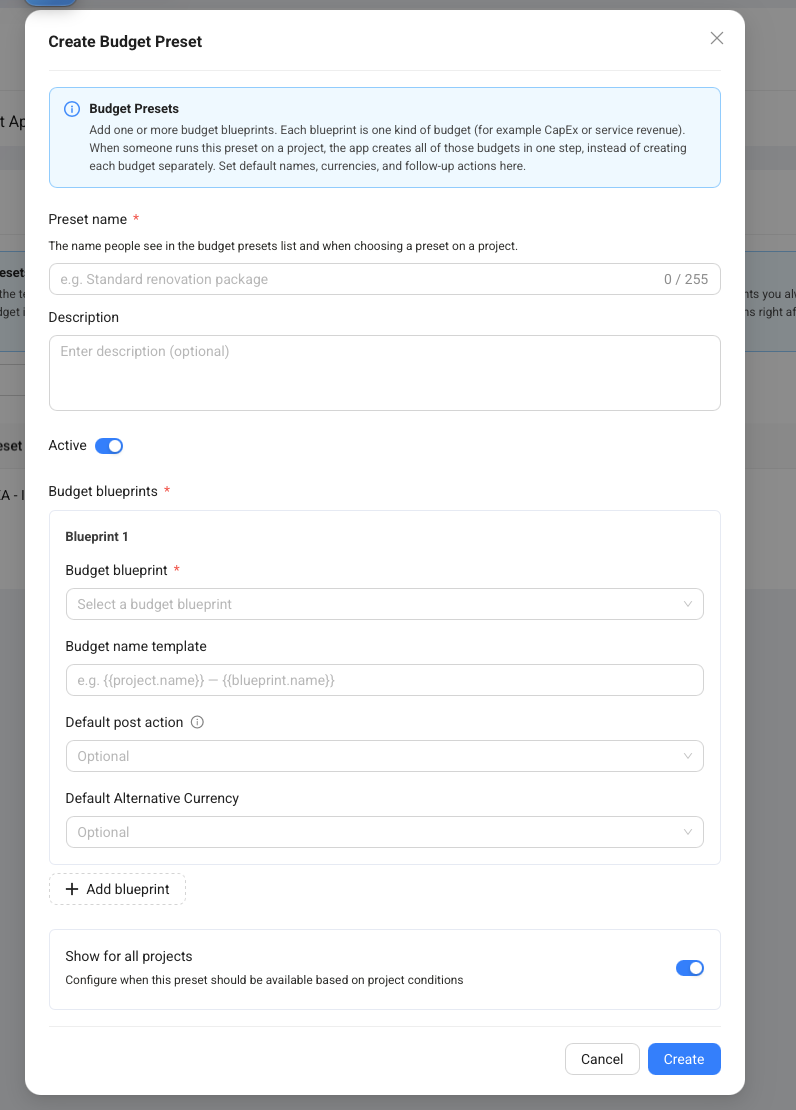
The Create Budget Preset dialog includes these main areas:
| Area | What you set up |
|---|---|
| Preset name | The name users choose when creating budgets from a project. |
| Description | A short note that explains when to use the preset. |
| Active | Whether the preset is available for project users. |
| Budget blueprints | The one or more Budget Blueprints included in the preset. |
| Budget name template | The default name pattern for the budget created from that blueprint. |
| Default post action | What should happen after the budget is created. |
| Default Alternative Currency | An optional alternative currency for that budget. |
| Project availability | Whether the preset is available for all projects or only matching projects. |
The Budget name template can use project and blueprint values. For example, {{project.name}} - {{blueprint.name}} creates a budget name that includes the project name and the blueprint name.
What Happens When You Run A Budget Preset
When you run a Budget Preset from a project, Compass shows the budgets that will be created before you confirm. This gives you one last review step.
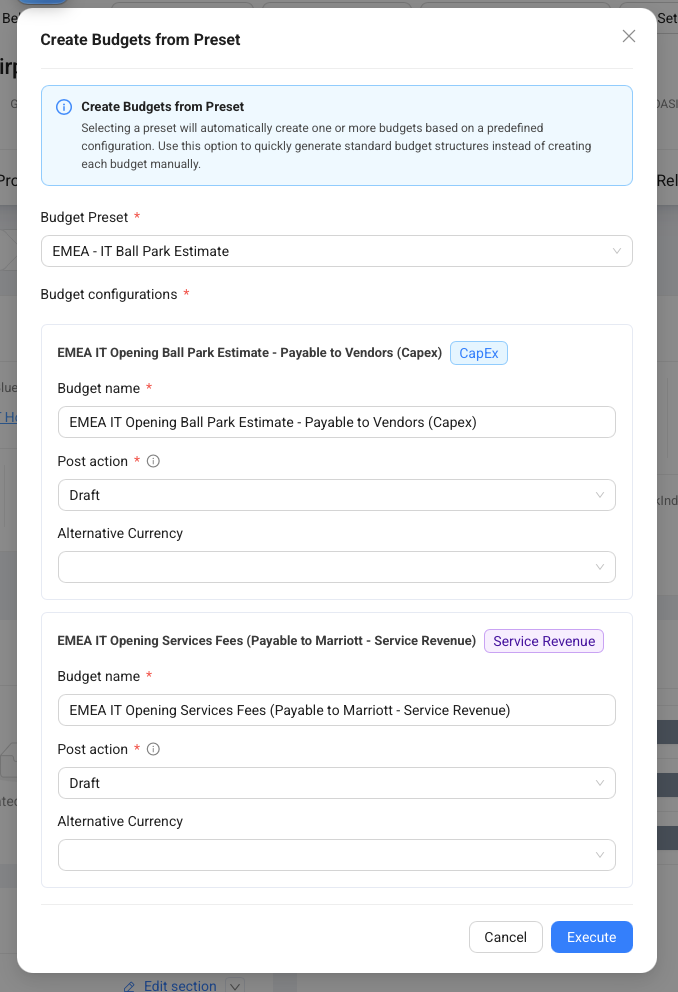
In the Create Budgets from Preset dialog, you can review each budget configuration:
- Budget name shows the name that will be used for the new budget.
- Post action controls what happens after creation, such as keeping the budget as a draft.
- Alternative Currency lets you choose a different alternative currency if needed.
After you click Execute, Compass creates the budgets for the project. Each budget starts from its Budget Blueprint. Compass also adds the blueprint's Budget Catalogs and starts budget item generation from those catalogs.
Post Actions After Budget Creation
The post action tells Compass what to do with each budget after the preset creates it. This helps teams choose whether new budgets should stay in draft or move forward right away.
Budget Presets can use these post actions:
| Post action | What it means |
|---|---|
| Draft | Create the budget and keep it as a draft for review. |
| Send for Approval | Create the budget and send it into the internal approval flow. |
| Mark Completed | Create the budget and mark it completed when no approval is required. |
Some post actions depend on the blueprint. Send for Approval is only available when the blueprint requires internal approval. Mark Completed is only available when the blueprint does not require internal or external approval.
Use Draft when users should review the generated budget before it moves forward.
When A Preset Is Available On A Project
A Budget Preset appears on a project only when it is active and allowed for that project. This helps users see the right presets without sorting through packages that do not apply.
Preset availability can depend on:
- whether the preset is active
- the project blueprint used by the project
- the user's role
- project conditions set in the preset visibility rules
For example, a hotel opening preset can be shown only for hotel opening projects. A regional preset can be limited to projects that match a certain country or project setup.
If a user cannot see a preset on a project, check whether the preset is active and whether the project matches the preset availability settings.
Duplicate Budgets And Safe Creation
Budget Presets help avoid duplicate budgets from the same Budget Blueprint. If the project already has a budget created from one of the preset's blueprints, Compass does not create that same blueprint budget again.
This matters when a preset contains several budgets. If one budget already exists and another does not, Compass can create the missing budget and report that the existing one was skipped.
The budget name is also checked during creation. If a budget with the same type and name already exists on the project, Compass adds a number to the new budget name, such as (2).
In simple terms: the preset tries to create the package, but Compass protects the project from accidental duplicate blueprint budgets.
Budget Preset, Budget Blueprint, Budget Catalog, And Budget
Budget Presets are easiest to understand when you compare them with the other Budget Estimator concepts.
| Concept | Plain explanation | Example |
|---|---|---|
| Budget Preset | A saved package that creates several budgets from a project. | EMEA - IT Ball Park Estimate |
| Budget Blueprint | The saved setup for one budget inside the preset. | IT CapEx Blueprint |
| Budget Catalog | The reusable list of budget logic linked to a blueprint. | IT Equipment Catalog |
| Budget Catalog Item | One reusable line inside a catalog. | Core Switch |
| Budget | The actual project budget created from the preset. | Munich Opening - IT CapEx Budget |
Think of it like packing a project starter kit. The Budget Preset is the kit, each Budget Blueprint is one prepared form inside the kit, and the Budget Catalogs provide the lines that fill those forms.
Best Practices For Budget Presets
Budget Presets work best when they represent common project packages, not every possible one-off situation. A clear preset helps project users choose the right package with confidence.
Use these practices when creating or maintaining Budget Presets:
- Name the package clearly. Users should understand what budgets the preset creates.
- Add only budgets that belong together. If two budgets are rarely needed together, keep them in separate presets.
- Use clear budget name templates. Names should make sense after they appear on the project.
- Choose post actions carefully. Use automatic approval or completion only when the business process supports it.
- Limit availability when needed. Show a preset only to the project types and roles that should use it.
- Keep blueprints up to date. The preset uses the current blueprint setup when it creates new budgets.
Common Questions About Budget Presets
Does a Budget Preset replace Budget Blueprints?
No. A Budget Preset depends on Budget Blueprints. The blueprint creates one budget, and the preset groups several blueprint-based budgets together.
Can a Budget Preset create only one budget?
Yes. A preset can include one blueprint, but it is most useful when it creates several budgets that belong together.
Can I edit the budgets after running a preset?
Yes. Each created budget becomes its own project budget. Users can review and edit it according to their permissions and the budget workflow.
Why can I not see a preset on a project?
The preset may be inactive, limited to another project blueprint, limited to another role, or blocked by its project visibility rules.
What happens if one budget from the preset already exists?
Compass skips the budget from the existing blueprint and can still create the other budgets that are missing.