Why Does a Completed Task Say Completion Date Unknown?
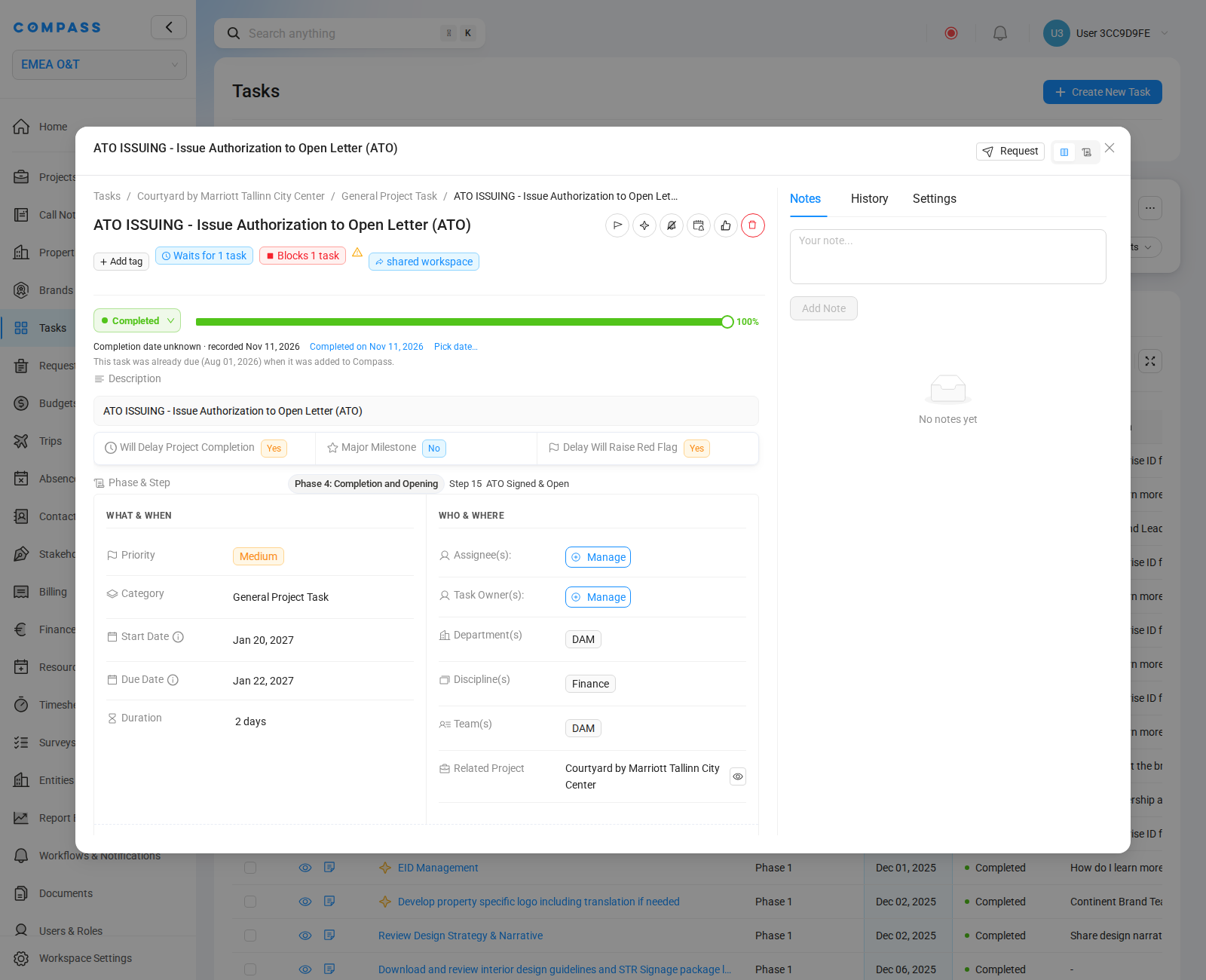
The task was already due on the day it was added to COMPASS. When you check off such a task, COMPASS records that it is done, but it does not know the day the work was really finished. So it leaves the completion date empty. You do not have to enter a date.
Why This Happens
Projects are often under way before their tasks come to COMPASS. For example, a new task catalog is added to a project that started months ago, or tasks are imported. Some of these tasks were due long before.
When you check off such a task, COMPASS does not pretend that you finished it today. If it did, every waiting time after the task would start again today. The opening forecast would jump later for no real reason.
So the task shows "Completion date unknown · recorded" followed by the day you checked it off. Below, a note says "This task was already due (Aug 01, 2026) when it was added to Compass." In the tasks table, the column Completion Date shows Unknown.
A task counts as already due when its due date had passed on the day it was generated or imported. There is no setting for this. It also applies to a task that is created late and checked off right away.
What to Do
You can leave the task as it is. Adding the completion date is optional, but it makes the opening forecast more exact.
- Open the task.
- If the work was finished on the day it was checked off, click Completed on followed by that day, for example Completed on Nov 11, 2026.
- If it was finished on another day, click Pick date… and choose the day. Days in the future and days after the recorded day cannot be chosen.
The task then shows Completed on with the day you chose. Click Change to choose another day, or Date unknown to remove the date again.
You only see Completed on and Pick date… when you may change the status of the task. If you set the task back to a working status, COMPASS treats it as normal work again.
How It Affects the Opening Forecast
Until a date is added, the Opening Forecast assumes the task was finished on its planned day. The forecast may then show a range: the earliest and the latest possible opening. Each date you add makes the range smaller. The task is never shown as late, and it is never blamed for a delay.
Still Not Working?
Contact your COMPASS Administrator or the COMPASS Support Team. Include:
- The name of the task and its project
- A screenshot of the task
- The day the work was really finished, if you know it