Opening Forecast
The Opening Forecast tells you when a project is likely to open. COMPASS looks at the open tasks of the project and the links between them. It works out the earliest day the opening task can be done, and compares that day with the target date.
Think of it as the arrival time in a navigation app. It shows when you will get there, and it updates whenever a task is done or slips.
An administrator switches the forecast on once for the workspace and once for each type of project. See How to Switch On the Opening Forecast.
Key Concepts
These are the terms you meet when you work with the Opening Forecast.
- Opening milestone — The task that marks the opening, for example the official opening announcement. When this task is done, the project is open.
- Opening configuration — The rule book of the forecast. It names the opening milestone, the task catalogs that drive the plan, and the date the forecast is compared with. Several Project Blueprints can share one configuration.
- Driving catalogs — The task catalogs whose tasks set the forecast. By default, this is the catalog that contains the opening milestone.
- Property — All projects that share the same External ID, even when they sit in different workspaces. Each property has exactly one forecast. Some screens call it a hotel.
- Range — Two dates instead of one. It appears when some completed tasks have no completion date, so COMPASS cannot be sure how much time has already passed.
What the Forecast Is Based On
The Opening Forecast is based on every task that has to be done before the opening. COMPASS collects these tasks in three ways, across all projects of the property.
- Driving catalogs — All tasks that come from the driving catalogs of the opening configuration. They form the main plan.
- Linked tasks from other catalogs and workspaces — COMPASS follows the dependencies backwards from the opening, step by step. When a task waits on a task from another catalog, that task counts too. The same applies to a task in a project of the same property in another workspace.
- Tasks marked Will Delay Project Completion — A task with Will Delay Project Completion set to Yes must be done before the opening, even without a dependency link.
Under the projected opening, a short line tells you what the forecast is based on. The second and third parts only appear when their number is above 0.
Example: "Based on E2E Tasks · plus 38 linked tasks from other catalogs · 2 marked “Will delay opening”". The plan comes from the catalog
E2E Tasks. 38 tasks from other catalogs lead to the opening, and 2 tasks are marked as delaying it.
A dependency can also point to a task of a different property. COMPASS does not count such a task and warns you, for example: "3 dependencies point to tasks outside this hotel and are not counted."
Notices Under the Forecast
The Opening Forecast shows a short notice when something could make the date less reliable. Each notice is one calm line, and nothing appears while all is well.
| Notice | What it means |
|---|---|
| "… dependencies point to tasks outside this hotel and are not counted." | A dependency leads to a task of another property. Check the dependency. |
| "… tasks were already due when they were added and are still open." | Tasks that were overdue when they came to COMPASS are still open. If they are done, mark them as completed. Click Open the project’s tasks. |
| "Projects of this hotel use different opening configurations." | The projects of this property disagree on the configuration. Only people who manage the forecast see it, with the link Review blueprints. |
The last notice is explained in Why do I see a notice about opening configurations?
Why the Forecast Can Show a Range
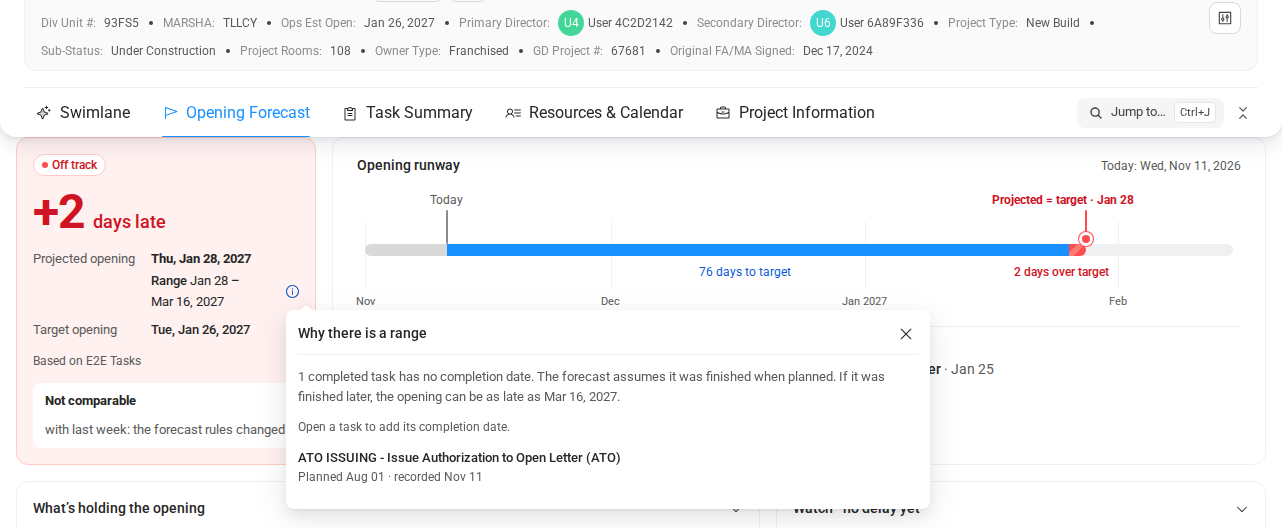
The Opening Forecast shows a range when some completed tasks on the way to the opening have no completion date. Under the projected opening, you then read, for example, Range Jan 28 – Mar 16, 2027.
The range runs from the earliest to the latest possible opening. The projected opening assumes that these tasks were finished on their planned day. The latest date assumes they were finished only on the day someone checked them off in COMPASS.
Click the small info icon next to the range. The window Why there is a range explains it, for example: "1 completed task has no completion date. The forecast assumes it was finished when planned." Below, it names each task, for example "Planned Aug 01 · recorded Nov 11". Open a task to add its completion date, and the range gets smaller or disappears. When all dates are known, no range is shown.
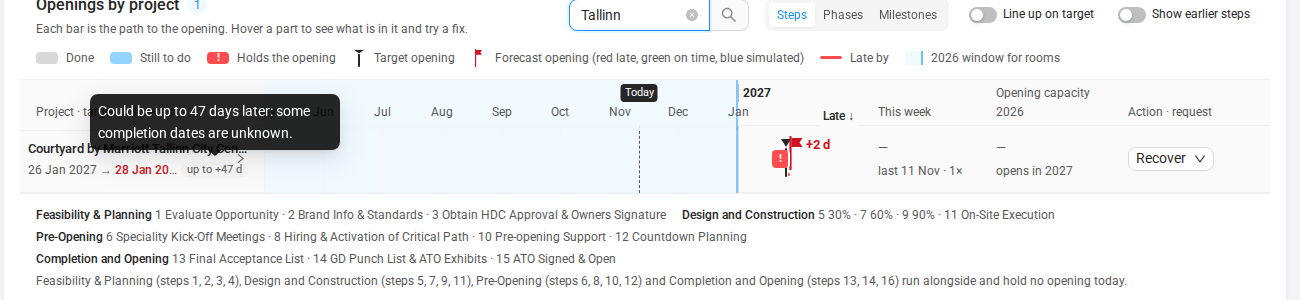
The range also appears in the Scenario Planner and when you use Recover in the Opening Forecast widget. In the rows of the widget, a small marker reads, for example, up to +47 d. Its tooltip says "Could be up to 47 days later: some completion dates are unknown."
One Forecast per Property
Everyone sees the same Opening Forecast for a property, no matter which workspace they open it from. COMPASS takes the opening configuration from the projects of the property whose Project Blueprint has the forecast on. The workspace you are working in does not change the result.
A project whose Project Blueprint has the forecast off gets no forecast of its own. It shows Opening Forecast is off for this project type. Its tasks still count for the other projects of the same property.
When an opening configuration changes, the forecast history starts again. COMPASS does not compare forecasts made with the old rules and the new rules, because the comparison would be misleading.
What Status Catch-Up Means
Sometimes the projected opening moves because people catch up on task status. For example, someone checks off old tasks or adds completion dates after the fact. COMPASS labels such a move Status catch-up and explains: "Tasks were checked off or dated after the fact. This is not a new delay."
A task without a known completion date is never shown as late, and it is never blamed for a delay. In the chain of tasks that leads to the opening, it shows Done without a date.
What You Can Do
The Opening Forecast is set up by an administrator and used by everybody who follows a project.
- Switch on the Opening Forecast and choose which project types get one
- Add a missing completion date to a task that was already due
- Understand why the forecast shows a range
- Find out why a project has no forecast
How It Connects to Other Modules
The Opening Forecast reads data from several parts of COMPASS and never changes a task.
- Task Management: Task catalogs, milestones, and dependencies are the raw material of the forecast. See Task Dependencies and Major Milestones.
- Projects: Each Project Blueprint has its own forecast switch. The External ID of a project decides which projects belong to the same property.
- Users & Roles: Only roles that can manage the Tasks settings can set up the forecast.