Why Does the Opening Forecast Show a Range?
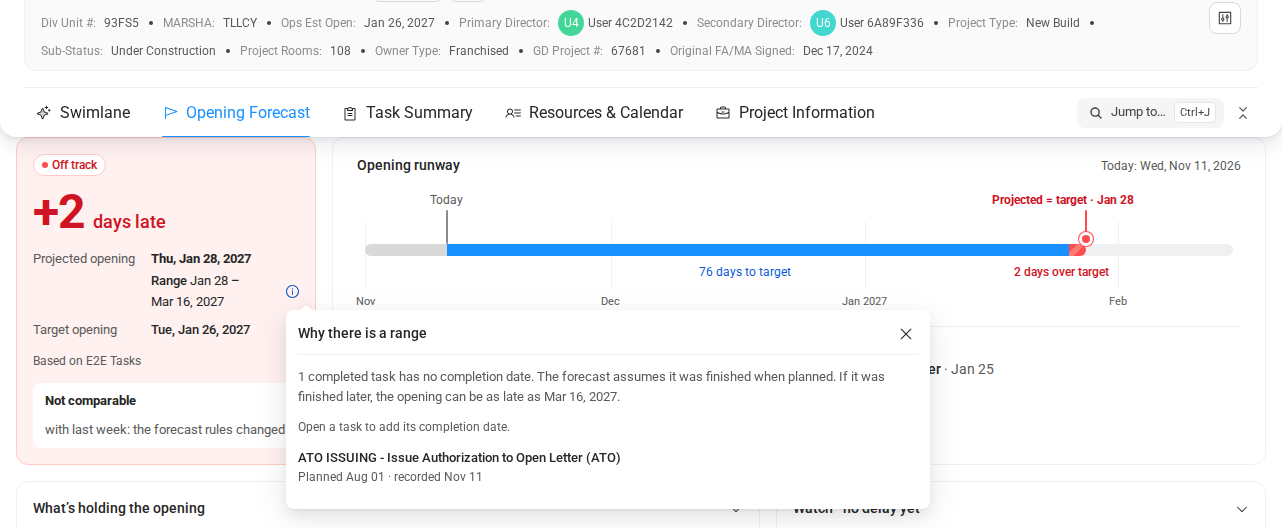
Some completed tasks on the way to the opening have no completion date. COMPASS does not know how much waiting time has already passed after them. So it shows the earliest and the latest possible opening, for example Range Jan 28 – Mar 16, 2027.
Why This Happens
A task can be completed without a completion date. This happens when the task was already due on the day it was added to COMPASS. Learn more in Why does a completed task say Completion date unknown?
The missing date matters when other tasks wait after it. Think of a delivery that arrives 120 days after the order. If you do not know when the order went out, you do not know when the delivery arrives.
Example: The task "Place order" was planned for
Aug 01, 2026. It was checked off onNov 11, 2026without a date, and the next task waits 120 days after it. The projected opening assumes the order went out on Aug 01: Thu, Jan 28, 2027. If it went out only on Nov 11, the opening can be as late as Mar 16, 2027.
The projected opening always assumes the planned day. The latest date assumes the day the task was checked off in COMPASS.
What to Do
Add the missing completion dates, and the range gets smaller or disappears. You do not have to: the range is information, not an error.
- Click the small info icon next to the range. The window Why there is a range opens.
- Read the list of tasks. Each one shows its planned and recorded day, for example "Planned Aug 01 · recorded Nov 11".
- Click a task to open it.
- Click Completed on followed by the recorded day, or Pick date… to choose another day.
When every task on the list has a date, the range disappears. Nothing is shown while the dates are certain.
Where Else You See the Range
The same range appears wherever the Opening Forecast is shown. You see it in the Scenario Planner, and when you use Recover in the Opening Forecast widget.
In the rows of the Opening Forecast widget, a small marker reads, for example, up to +47 d. Hold the mouse over it to read "Could be up to 47 days later: some completion dates are unknown."
Still Not Working?
Contact your COMPASS Administrator or the COMPASS Support Team. Include:
- The name of the project
- A screenshot of the range and of the window Why there is a range
- The tasks you already gave a completion date